Demon Slayer Inspired AI Art: Create Stunning Breathing Style Visuals
There are times when you watch epic anime fights and think, "I wish I could do that". The whirling water, fires, and lightning strikes are almost impossible to come up with - until now. Dreamina makes bringing your ideas to the screen in anime style a breeze.
What's so new and thrilling about this shift is the way the tools have grown from a random anime character generator to a creative process. No longer are you restricted to avatars. Now you can create breathtaking breathing-style scenes that are cinematic, emotive and personal.
Let's take a look at how to create your own beautiful effects
Understanding the soul of breathing styles
Breathing styles are more than just decorative effects; they are rhythm, discipline and emotion. They each have their own personality.
Water styles tend to be fluid and gentle, whereas fire styles can be fierce and intense. Thunder-like styles are fast and intense. When you make your own, try to convey that mood. Think about:
The element you want to express
The mood behind the attack
The environment supporting the scene
This combination of factors leads to meaningful and not arbitrary visuals.
Creating a memorable character
The main element in a breathing-style design is a central character. They define the posture, costume and expression.
A confident posture can convey authority, while soft folds in the clothing or a determined look in the eyes can add nuance. Design the scene with a clear intention to convey the scene's mood to the viewer. Don't overcrowd the stage. A distinct personality with an effect will be more memorable than a busy frame.
Eliciting Feelings Using Anime Scenes Generated by AI
Through the use of the Dreamina AI art generator, the usual concepts become stunning anime scene designs full of atmosphere and feelings due to the carefully created depth and lighting.
Creating the illusion of motion
Though you are producing still images, visuals should be breathing. You can create the effect of motion through composition and lighting.
Movement (such as waves or fire) draws us in. Shadow and light increase drama, and other items in the background support the action. With the right touch, it's as though you've captured an instant from an anime fight.
Sparks, swirls and strokes: animating with Dreamina
Step 1: Describe your scene
Go to Dreamina and enter your prompt text. Consider how you would describe your picture to an illustrator who isn’t familiar with your vision yet. Focus on character features, clothes, breathing techniques and the environment.
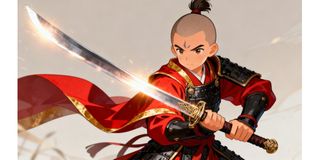
Example: A young fighter in a traditional outfit, using fire breathing, orange fire on his sword, sparks, determination and concentration, a dark scene with shadows adding up to atmosphere, anime style, cinematography, detail.
Step 2: Tweak settings and create
Now that you’ve entered your text prompt, alter the settings. Choose a character which best suits anime-style pictures. Then determine the aspect ratio considering your picture composition.
Vertical formats accentuate the hero, while horizontal formats leave more space for effects. Set a resolution of either 1K or 2K to improve details and light effects. Once you’ve finished editing your settings, click on the Dreamina logo to generate your artwork in anime style.
Step 3: Customize and download
After generating your picture, use Dreamina’s features to edit it. Editing can help you perfect your creation and make it truly yours.
Modify your work through inpaint. Focus on facial expressions and any other details. Make sure to crop the picture to emphasize the action or remove any irrelevant objects. Alter the lighting to give your scene atmosphere. Finally, hit Download to save the image.
Turning breathing visuals into anime video scenes
When you're satisfied with your image, you can take your idea further by turning it into a video. This gives your story another dimension, and brings your idea to life.
The Dreamina AI video generator is designed to generate anime-style videos from text or images. This lets you create an entire scene, rather than just a single image.
To begin, choose a moment in your art. This may be just before the attack or at the height of the technique. Work to describe this moment in your prompt, including the setting, lighting and tone.
You can also refer to your image. This ensures your video is consistent with your concept in terms of character design and aesthetic.
Be clear and specific in your prompt. Include details such as glow, ambience and energy. This ensures a consistent video result that's part of an anime scene.
You'll end up with a stylised scene that adds more interest to your breathing-style concept.
Adding subtle details for a stronger impact
Once you've got the hang of it, you can add a few creative touches. Play with different colour schemes. Play with the brightness to achieve peaceful or aggressive moods. Changes in perspective can change the mood of your artwork.
These touches make your visuals more distinctive and meaningful.
Avoiding common creative pitfalls
Though the method seems easy, there are certain mistakes to be avoided. Generic effects can occur through vagueness or lack of detailed prompts. Omitting lighting and compositional aspects will cause uninteresting visual effects. Missing out on customizing aspects means missing crucial elements.
Express your anime concept
Visualization of breathing does not mean creating visuals alone. On the contrary, the process entails expressing your emotions and experiences through visual creations.
With Dreamina, you can easily express yourself with great freedom of creativity. With all that is required provided to you by Dreamina, you will be able to express your feelings through elaboration. You can personalize and create your own videos, too.